Moderation cards and flipcharts belong to coaches and consultants like blackboard and chalk to a teacher, or stethoscope and syringe to a doctor. The online setting needs an alternative: the so-called digital whiteboard. And because many (systemic) coaching methods can be run with it, we were not surprised that this tool was one of the most requested by our community in our recent survey.
A quick overview of the functions
So we were happy to comply and have integrated a digital whiteboard into coachingspace. Even though we keep developing it busily in the background, the current version already contains numerous important functions: for example, you can create and label moderation cards, draw in every conceivable color and write texts, and everything created this way can be selected with a left click, moved, resized and of course deleted again.
The whiteboards created this way save automatically in the background, like all our other tools. You can create as many whiteboards as you like, and of course our whiteboard is privacy-compliant too, quite unlike many other tools on the market.
You can invite your clients onto already prepared whiteboards or create one collaboratively with them. That means clients can access the functions above as well, and both parties see synchronously what the other is doing. Coaches can also withdraw this permission from their clients by clicking the padlock symbol at the top left.
The whiteboard can also be panned with a held right click and zoomed in and out via the scroll function of the mouse or touchpad. That makes clear there is plenty of room on the whiteboard for numerous coaching methods. Speaking of which…
The whiteboard in a practical example
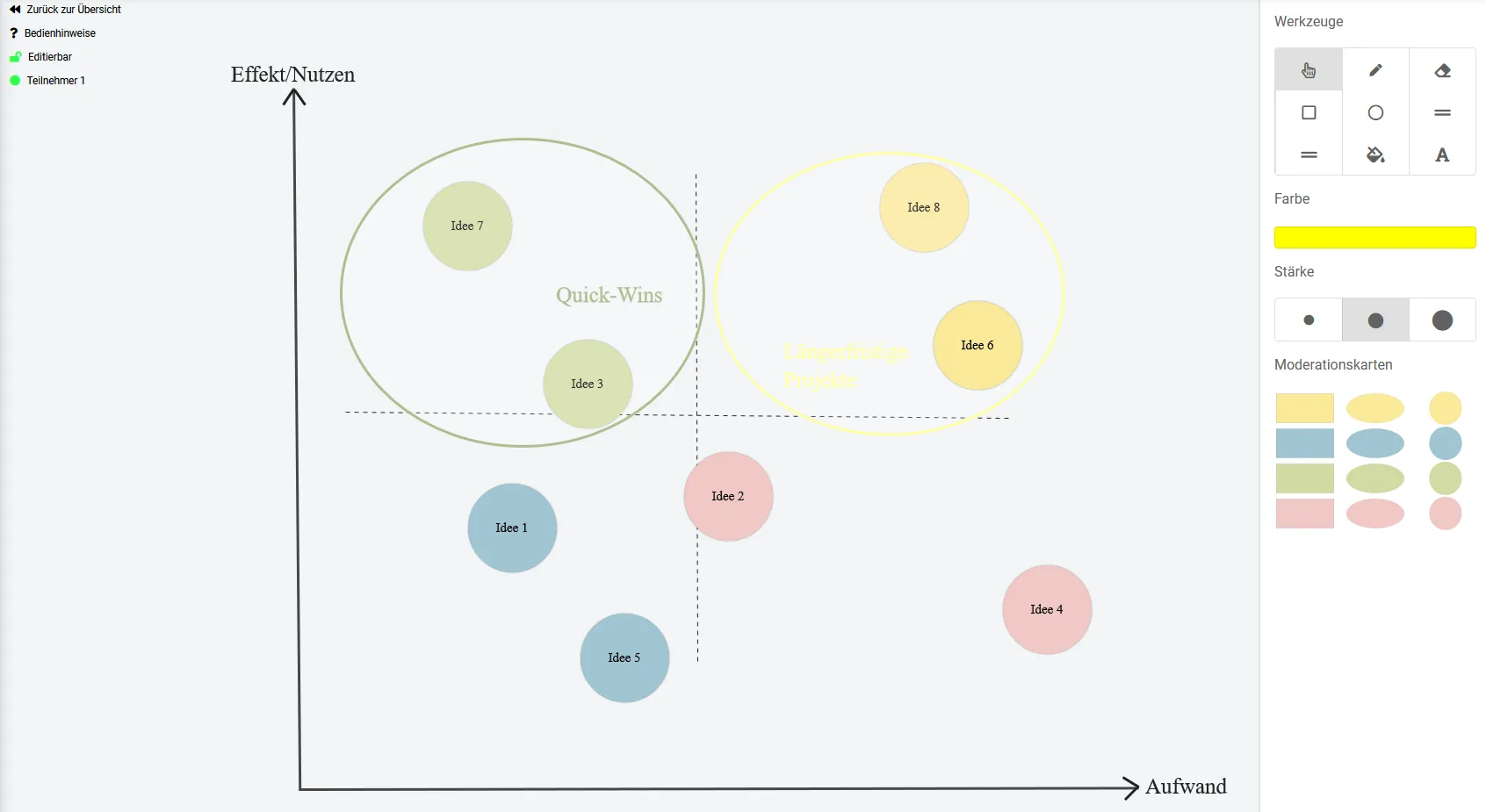
The action priority matrix as one of the many possible uses of the new digital whiteboard in coachingspace
The action priority matrix as one of the many possible uses of the new digital whiteboard in coachingspace
In the example, the so-called action priority matrix was applied. With the consultant's support, the client first collects all ideas with which he would like to improve, for example, his current situation. In the next step, the possible measures found this way are sorted into the matrix shown according to their estimated effect/benefit ("potential for change") and the effort involved.
Ideas in the top left quadrant count as "quick wins" (little effort, but big benefit) and should be implemented first. Ideas in the top right quadrant are more demanding, but the client also expects a big effect from them. They therefore count as "longer-term projects", from which the client should choose one and tackle it. Together with the consultant, the client now develops intermediate goals to implement the quick wins and his chosen longer-term project successfully.
Now it is your turn: log in and start testing. As always, we welcome wishes and suggestions for improvement. A tutorial video will follow shortly on our YouTube channel.